Best Thunderbolt Docks for Mac (2026) Reviewed
Thunderbolt docks transform your MacBook into a full desktop workstation with a single cable connection. These picks cover everything from premium 18-port powerhouses to compact travel-friendly hubs—all tested and verified for Mac compatibility.
What to Look For
- Thunderbolt version — Thunderbolt 4 offers 40Gbps bandwidth and universal compatibility with M-series Macs; Thunderbolt 5 delivers 80Gbps but requires newer hardware
- Power delivery — Look for 90W+ to fast-charge 14″ and 16″ MacBook Pros; 60W works fine for MacBook Air and 13″ Pro models
- Display support — Base M1/M2/M3 Macs only support one external display via Thunderbolt; Pro/Max chips support dual displays
- Port selection — Prioritize downstream Thunderbolt ports, USB-A for legacy devices, and dedicated video outputs like HDMI or DisplayPort
- Ethernet speed — 2.5GbE is becoming standard and offers significant speed improvements over Gigabit for NAS and fast internet connections
Product Recommendations
CalDigit TS4 — Best Overall
The gold standard for Mac docks with 18 ports, 98W charging, and unmatched build quality.
The TS4 remains the most recommended Thunderbolt 4 dock for Mac users years after its release. It delivers the highest sustained charging power of any TB4 dock at 98W, three downstream Thunderbolt 4 ports, and a 2.5GbE ethernet connection. The aluminum enclosure matches Apple’s design language and can sit horizontally or vertically.
Pros
- Industry-leading 18-port configuration with 8 USB ports at full 10Gbps speed
- 98W charging never drops under load like competing docks
- Supports dual 6K displays on M-series Pro/Max Macs
- UHS-II SD and microSD card readers
Cons
- Premium price point
- No built-in HDMI—requires adapter for most monitors
Best for: Professionals who need maximum connectivity and reliable power delivery for demanding workflows.

OWC Thunderbolt Go Dock — Best for Travel
The first full-featured Thunderbolt 4 dock with a built-in power supply—no external brick required.
OWC eliminated the bulky power adapter by integrating it directly into the dock chassis. You get 11 ports including HDMI 2.1, 2.5GbE ethernet, and 90W charging in a package that travels easily between home and office. The dock uses a standard figure-8 power cord that’s easy to replace if lost.
Pros
- Built-in power supply eliminates the external brick
- Native HDMI 2.1 port supports 4K@120Hz or 8K@60Hz
- 90W charging handles 16″ MacBook Pros
- Includes Thunderbolt Share support for easy computer-to-computer transfers
Cons
- Slightly larger footprint than comparable docks
- Only one downstream Thunderbolt port
Best for: Users who move between workstations or need a portable dock without juggling a separate power brick.

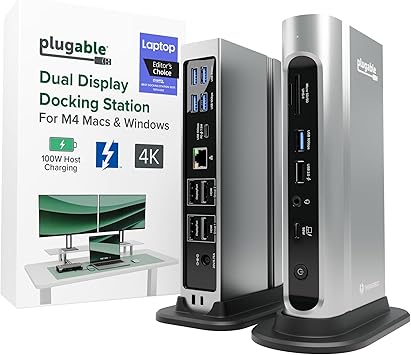
Plugable TBT4-UDZ — Best for Dual Monitors
A 16-port dock with dual HDMI and dual DisplayPort outputs for maximum display flexibility.
The TBT4-UDZ stands out with four dedicated video outputs—two HDMI 2.0 and two DisplayPort 1.2—making it easy to connect dual 4K displays without adapters. Laptop Mag named it their 2025 Dock of the Year. The 100W power delivery handles even power-hungry laptops, and 2.5GbE ethernet keeps your network connection fast.
Pros
- Four native video outputs eliminate the need for adapters
- 100W power delivery (96W certified)
- Seven USB ports including front-facing USB-C
- UHS-II SD and microSD readers
Cons
- Base M1/M2 Macs limited to single display
- Larger chassis than minimalist docks
Best for: M4 or M-series Pro/Max Mac users who need dual 4K monitors with native HDMI and DisplayPort connections.
UGREEN Revodok Max 208 — Best Budget
A compact 8-in-1 Thunderbolt 4 dock with 85W charging at a competitive price point.
UGREEN delivers legitimate Thunderbolt 4 performance without the premium price. The Revodok Max 208 includes three downstream TB4 ports, Gigabit Ethernet, and 85W charging—powered by an included 140W GaN charger. It supports dual 4K@60Hz displays on Pro/Max Macs and includes an upgraded cooling system to prevent thermal throttling.
Pros
- Three downstream Thunderbolt 4 ports for maximum flexibility
- 140W GaN charger included—no separate purchase needed
- Compact aluminum design with efficient heat dissipation
- Aggressive pricing undercuts major competitors
Cons
- Gigabit ethernet instead of 2.5GbE
- No built-in card reader
Best for: Budget-conscious Mac users who want genuine Thunderbolt 4 performance without paying premium prices.
Kensington SD5780T — Best for Enterprise
A security-focused dock with TAA compliance, DockWorks software, and dual Kensington lock slots.
Kensington built this dock for corporate and government environments where security matters. It includes Intel VT-d DMA protection, MAC address pass-through, and optional DockWorks management software. The dock delivers 96W charging, HDMI 2.1, and 2.5GbE ethernet. Dual lock slots—standard and nano—let you physically secure the dock to furniture.
Pros
- TAA-compliant for U.S. government procurement
- DockWorks software enables IT management features
- Native HDMI 2.1 port
- Three-year warranty exceeds industry standard
Cons
- No dedicated USB-C ports on rear panel
- Premium enterprise pricing
Best for: IT departments and enterprise users who need centralized dock management and physical security features.
CalDigit Thunderbolt 4 Element Hub — Best Compact
A minimalist hub with four Thunderbolt 4 ports and four USB-A ports in a palm-sized package.
The Element Hub strips away the extras to focus on pure Thunderbolt connectivity. Four TB4 ports let you connect displays, SSDs, and daisy-chain additional devices, while four USB-A 10Gbps ports handle keyboards, mice, and drives. At just 0.39 lbs, it’s ideal for desktop or iMac users who already have ethernet and audio covered.
Pros
- Ultra-compact reversible design works on either side of your laptop
- Four full-speed Thunderbolt 4 ports for displays and storage
- Consistent 60W charging that doesn’t drop under load
- Works with iMac and Mac Pro to add front-accessible ports
Cons
- No ethernet, card reader, or audio ports
- 60W charging insufficient for 16″ MacBook Pro
Best for: Minimalists and desktop Mac users who need Thunderbolt port expansion without redundant features.
Satechi Thunderbolt 4 Slim Hub Pro — Best for Portability
A sleek 5-in-1 hub with 96W charging that fits easily in a laptop bag.
Satechi refined their popular Slim Hub with a larger 150W GaN power supply that delivers 96W to your MacBook—a 60% increase over the original. The aluminum chassis stays cool during intensive use and weighs just over half a pound. Three downstream Thunderbolt 4 ports support daisy-chaining up to six devices.
Pros
- Compact design with included storage bags for travel
- 96W charging from upgraded 150W GaN power supply
- Supports dual 4K@60Hz or single 8K display output
- Native PCIe support for external GPUs and fast SSDs
Cons
- No ethernet or card reader built-in
- Front ports placed close together
Best for: Frequent travelers who need legitimate Thunderbolt 4 performance in the smallest possible package.
UGREEN Revodok Max 213 — Best Mid-Range
A full-featured 13-port dock with 90W charging and 2.5GbE ethernet at a reasonable price.
The Revodok Max 213 competes directly with premium docks costing significantly more. You get two Thunderbolt 4 ports, DisplayPort 1.4, 2.5GbE ethernet, UHS-II card readers, and 90W charging. The included 180W GaN charger provides headroom for demanding setups without power throttling.
Pros
- 2.5GbE ethernet at mid-range pricing
- UHS-II SD and microSD readers (312MB/s)
- DisplayPort 1.4 output in addition to Thunderbolt
- 90W charging handles most MacBooks comfortably
Cons
- No native HDMI—requires adapter for most monitors
- Base M1/M2/M3 Macs limited to single display
Best for: Mac users who want near-premium features without paying flagship prices.
Plugable TBT4-UD5 — Best Value
A 13-port dock with dual HDMI, downstream Thunderbolt 4, and 100W charging at an accessible price.
Named Best Thunderbolt Docking Station by Tom’s Guide, the TBT4-UD5 delivers premium features at mainstream pricing. Dual HDMI ports drive two 4K@60Hz displays without adapters, a downstream Thunderbolt 4 port handles fast storage, and 100W power delivery keeps your MacBook charged. It’s Intel Evo verified for optimal laptop compatibility.
Pros
- Dual native HDMI 2.0 ports for direct monitor connections
- Downstream Thunderbolt 4 port for fast SSDs or displays
- 100W power delivery (96W certified)
- Gigabit ethernet and UHS-II card readers included
Cons
- Gigabit ethernet instead of 2.5GbE
- Single downstream Thunderbolt port
Best for: Mac users seeking the best balance of features, display connectivity, and price.
Verdict
The CalDigit TS4 remains the top choice for Mac users who need maximum ports and reliable 98W charging for any workflow. For those watching their budget, the Plugable TBT4-UD5 delivers excellent dual-monitor support and strong charging at roughly half the price.