Best Wireless Mouse for Mac Laptop (2026) Reviewed
Looking for a wireless mouse that pairs seamlessly with your MacBook? Here are the top options covering everything from premium productivity mice to budget-friendly portables and gaming options.
What to Look For
- Bluetooth connectivity — Native Bluetooth works without a dongle and preserves your limited USB-C ports; some mice include USB receivers for lower latency
- USB-C charging — Matches your MacBook’s charging cable and avoids the need for disposable batteries
- macOS optimization — Mice built for Mac support native gestures and include companion software with Mac-specific profiles
- Multi-device pairing — Useful if you switch between a MacBook, iPad, and desktop Mac throughout the day
- Size and ergonomics — Full-size mice offer better comfort for extended use while compact options travel better
Product Recommendations
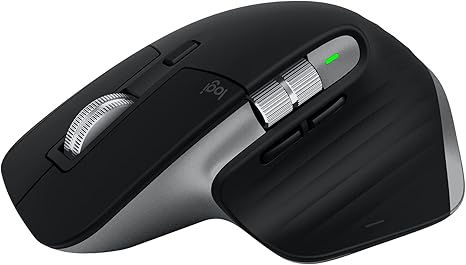
Logitech MX Master 3S for Mac — Best Overall
The gold standard for Mac productivity with an 8K DPI sensor, quiet clicks, and MagSpeed scrolling that handles any surface including glass.
The MX Master 3S for Mac delivers ergonomic comfort with a sculpted design that supports natural wrist posture during long work sessions. The electromagnetic MagSpeed scroll wheel shifts automatically between precise line-by-line scrolling and free-spinning mode for long documents. Logi Options+ software unlocks app-specific button customizations for tools like Photoshop and Final Cut Pro.
Pros
- Tracks on any surface including glass with 8K DPI precision
- 70-day battery life with USB-C quick charging
- Pairs with up to three Mac devices with seamless switching
- Quiet clicks reduce noise by 90% compared to previous models
Cons
- Larger size makes it less portable than compact alternatives
- Logi Bolt receiver sold separately
Best for: Professionals who spend hours at a desk and want premium ergonomics with deep macOS integration.
Apple Magic Mouse — Best for Apple Ecosystem
Apple’s own wireless mouse offers Multi-Touch gesture support and automatic pairing that no third-party mouse can match.
The Magic Mouse treats its entire top surface as a trackpad, enabling swipes between pages and momentum scrolling through documents. The low-profile aluminum design glides smoothly and looks right at home next to your MacBook. The latest version charges via USB-C and pairs instantly with any Bluetooth-enabled Mac or iPad.
Pros
- Multi-Touch surface supports macOS gestures natively
- Sleek aluminum build matches Apple hardware perfectly
- Month-long battery life between charges
Cons
- Charging port on the bottom prevents use while charging
- Flat profile causes hand fatigue for some users during extended sessions
- Only two buttons limits functionality compared to competitors
Best for: Apple loyalists who prioritize gesture controls and seamless ecosystem integration over ergonomics.

Logitech MX Anywhere 3S for Mac — Best Portable
A compact powerhouse with the same MagSpeed scrolling and quiet clicks as its larger sibling, built specifically for mobile Mac users.
The MX Anywhere 3S for Mac weighs just 99 grams and fits easily in a laptop bag while delivering desktop-level precision. The 8K DPI sensor tracks on virtually any surface, and the contoured silicone grips keep it comfortable during travel. USB-C quick charging provides three hours of use from a one-minute charge.
Pros
- Compact size ideal for travel without sacrificing performance
- Works on glass and other challenging surfaces
- 70-day battery life with fast USB-C charging
- Matches Apple finishes in Space Gray and Pale Gray
Cons
- Smaller form factor may feel cramped for larger hands
- Premium price for a travel mouse
Best for: MacBook users who work from coffee shops, airports, and other locations outside their primary desk.

Logitech M720 Triathlon — Best Multi-Device
Connects to three devices simultaneously with one-button switching and a two-year battery life for users juggling multiple computers.
The M720 Triathlon excels at multi-device workflows with Easy-Switch technology that moves between Mac, iPad, and Windows machines instantly. The full-sized ergonomic shape with rubber grips supports all-day use, and the hyper-fast scroll wheel flies through documents. Logitech Flow software lets you drag files between computers on different operating systems.
Pros
- Pairs with three devices via Bluetooth or included USB receiver
- 24-month battery life on a single AA battery
- Comfortable right-hand design with soft rubber surfaces
- Buttons rated for 10 million clicks
Cons
- Requires USB-A adapter to use the receiver with modern MacBooks
- Right-handed design only
Best for: Anyone who regularly switches between multiple devices and wants reliable long-term battery life.
Logitech Pebble 2 M350s — Best Budget Compact
A slim, silent, and affordable Bluetooth mouse that slips into any bag and works across Mac, iPad, and iPhone.
The Pebble 2 M350s removes 90% of click noise with Silent Touch technology while maintaining a satisfying tactile feel. The minimalist round design weighs almost nothing and connects to up to three devices via Bluetooth. A single AA battery lasts two years thanks to auto-sleep power-saving mode.
Pros
- Ultra-quiet clicks ideal for libraries and shared workspaces
- Connects to three devices with Easy-Switch button
- Two-year battery life with included AA battery
- Available in multiple colors to match your setup
Cons
- Flat profile lacks ergonomic palm support
- Basic feature set without programmable buttons
Best for: Students and light users who need an affordable, quiet mouse for on-the-go productivity.
Satechi M1 — Best Mac Aesthetic
An aluminum Bluetooth mouse designed to match Apple hardware with USB-C charging and a clean minimalist look.
The Satechi M1 features a brushed aluminum finish in Space Gray that complements MacBooks and iMacs perfectly. The curved ergonomic shape works for both left and right-handed users, and the USB-C charging port eliminates battery replacements. Bluetooth connectivity reaches up to 32 feet without a dongle taking up port space.
Pros
- Premium aluminum construction matches Apple aesthetics
- USB-C rechargeable with weeks of battery life
- Ambidextrous design works for either hand
- Affordable price point for aluminum build quality
Cons
- Single-device pairing limits multi-device workflows
- Basic 1200 DPI sensor trails premium competitors
- Lacks advanced features like programmable buttons
Best for: Users who prioritize visual cohesion with their Apple setup and want reliable basics at a fair price.
Logitech M330 Silent — Best Quiet
A proven silent mouse with SilentTouch technology that reduces click noise by over 90% for shared spaces.
The M330 Silent delivers the same click feel as standard mice while producing almost no audible sound. The right-handed contoured shape with soft rubber grips supports comfortable extended use. An 18-month battery life and plug-and-play USB receiver make setup effortless.
Pros
- Certified quiet by the UK Noise Abatement Society
- Comfortable right-hand ergonomic design
- 18-month battery life with auto-sleep mode
- Made with post-consumer recycled plastic
Cons
- Requires USB-A receiver rather than Bluetooth
- Right-handed design only
- Basic feature set without scroll wheel modes
Best for: Office workers in quiet environments who need reliable silence without spending extra for premium features.
Razer Viper V3 HyperSpeed — Best for Gaming
A lightweight wireless gaming mouse with a 30K DPI sensor and 280-hour battery life for Mac gamers who want competitive performance.
The Viper V3 HyperSpeed weighs just 82 grams with a centralized mass distribution for fast, consistent swipes. The Focus Pro 30K optical sensor tracks on any surface including glass, and HyperSpeed wireless technology delivers lag-free performance even in environments with heavy wireless interference. Eight programmable buttons cover macros and shortcuts through Razer Synapse.
Pros
- 82g lightweight design optimized for quick movements
- 280 hours of battery life on a single AA battery
- 30K DPI sensor with glass tracking capability
- 60-million click mechanical switches
Cons
- Razer Synapse software has limited Mac support
- Requires USB-A receiver rather than Bluetooth
- Gaming-focused design may look out of place in professional settings
Best for: Mac gamers who want wireless freedom without sacrificing the responsiveness and precision of wired gaming mice.
Verdict
For most Mac laptop users, the Logitech MX Master 3S for Mac offers the best combination of ergonomics, precision, and macOS integration. If portability matters more than comfort, the MX Anywhere 3S for Mac delivers similar performance in a travel-friendly package. Budget-conscious buyers should consider the Pebble 2 M350s for its quiet operation and multi-device support at a fraction of the premium price.